Week 2 of 6
Agentic Creativity
Models, Text Generation, and Everyday Tasks
Live on Zoom · 2.00–4.30pm ET
23 August 2026
Derrick Schultz
before we begin
Reply to the class agent.
Find the email from agenticcreativity@gmail.com and send one person, project, question, or research direction you would like it to investigate.
Your replies become research requests for our shared course inbox. Include useful links or context, but nothing private.
Course schedule
Week 1 · Aug 16
Introduction to agentic creativity and Hermes Agent setup
Week 2 · Aug 23
Models, Text Generation, and Everyday Tasks
Week 3 · Aug 30
Skills and MCPs
Sep 6
No class
Week 4 · Sep 13
Long-running agents and how they change over time
Week 5 · Sep 20
An introduction to agentic coding
Week 6 · Sep 27
Show and tell
Last week’s recording is available. If something did not work on your computer, ask in Discord.
Today’s schedule
2.00
Review last week: what broke, what it cost, and what the agent could access
2.20
Models, context, workspace, and memory in Hermes
3.05
Break
3.10
Tools, access, and approval settings
3.30
Text generation in practice: research, email, and documents
3.50
Task workflows: test a job by hand, then schedule it
4.15
Work time, homework, and questions
Let’s look at what did not work.
Your prompt
Save the exact words you used. A prompt often explains why the agent made a particular choice.
Its actions
Compare its summary with the files, pages, or messages it actually changed.
Where it stopped
Did it finish the task incorrectly, or stop before it was done?
What it cost
Note the approximate token cost. We will use that as we talk about models.
Problems are useful evidence. They show us what needs to be clearer or better constrained.
Desktop and cloud agents begin with different access.
Desktop
It could see the practice folder, so it could work with real files on your computer.
Cloud
It began without your files, history, or setup. You had to provide anything it needed to know.
What this tells us
An agent can only work with the information and tools it has access to. Access is not the same thing as intelligence.
Cost
Both use model calls. A cloud instance can also have running costs while it is idle.
01
Hermes settings
2.20–3.05 · 45 minutes
settings to know
Your model, context files, workspace, and memory shape a Hermes session.
The model chooses the next step. AGENTS.md gives project rules. SOUL.md sets durable voice and defaults. Workspace and memory settings affect what Hermes can reach and retain.
the context window
The context window is the model’s working memory for one turn.
Each time Hermes asks the model to respond, it sends a limited amount of text. That text is the context window.
System instructions, context files, earlier messages, and tool results all share that same space. The more room they take, the less remains for the next response.
System prompt
Hermes instructions + SOUL.md
Project and memory context
AGENTS.md + USER.md + MEMORY.md
Conversation so far
Messages + tool results
Space left
The next response and tool call
A larger context window holds more material, but it is still finite. Later, we will look at what Hermes does when it starts to fill.
before the chat begins
Hermes builds context from a few different layers.
Hermes
Core system prompt
Hermes supplies its own instructions for the agent loop, tool use, and safety. You do not edit this file.
Identity
SOUL.md
The agent’s durable identity, tone, and default behavior. Hermes creates a starter file if one is missing.
Project
One project context type
Hermes uses the highest-priority file it finds, such as .hermes.md, AGENTS.md, or CLAUDE.md.
Saved context
USER.md and MEMORY.md
Optional persistent information about you and your work, loaded when memory is enabled.
You do not need to create every file. The useful first pair is SOUL.md for the agent and AGENTS.md for a project. · Docs: Context files
context files
AGENTS.md and SOUL.md answer different questions.
AGENTS.md tells Hermes how to work in a particular project: its structure, conventions, commands, and constraints.
SOUL.md tells Hermes who it is across projects: its tone, communication style, and default way of handling uncertainty.
A useful rule: if it should follow the agent everywhere, put it in SOUL.md. If it belongs to one project, put it in AGENTS.md.
Where Hermes finds them
- AGENTS.md
- In the project directory tree
- Scope
- Project-specific
- SOUL.md
~/.hermes/SOUL.md- Scope
- All projects in this Hermes instance
Hermes loads SOUL.md independently from project instructions.
what goes where
Keep the two files focused.
AGENTS.md · one project
SOUL.md · every project
After editing SOUL.md, start a new session to use the new identity. Keep both files short: they take up context on every relevant turn. · Docs: Context files · Docs: SOUL.md
Memory is different from project instructions.
AGENTS.md
Rules for this project: its structure, commands, conventions, and limits. You or the project authors it.
USER.md
A short profile about you: preferences, role, and communication expectations. Hermes can maintain it.
MEMORY.md
Facts Hermes has learned about your environment or ongoing work. It can persist across sessions.
Write approval
Turn on memory.write_approval if you want to approve every memory update instead of letting Hermes save them automatically.
Memory is loaded at the start of a session. Use a new session after an important change, and keep secrets out of memory files.
the chat context stack
Every Hermes turn includes more than your latest message.
The model receives a stable setup plus the conversation so far. Each tool result becomes part of the next turn, which is why long agent tasks use more tokens.
System prompt
Hermes core instructions + safety
SOUL.md — identity and style
AGENTS.md — project rules
USER.md + MEMORY.md — saved context
This chat so far
Earlier messages and replies
Tool calls and their results
New message
What you just asked
SOUL.md replaces the default identity,
not the whole system prompt. New sessions
pick up SOUL.md and memory changes.
a session is temporary working context
A session holds the work in progress, not everything Hermes knows forever.
It starts with
Hermes’ system prompt, your SOUL.md, project instructions, and the current saved-memory snapshot.
It grows with
Your messages, the agent’s replies, and every tool result from the work you do together.
A new session
Starts fresh from that stable setup. It does not carry the full working conversation forward.
Practical habit
Keep one focused task per session. Put rules and durable facts in files Hermes can load again.
Project files and saved memory can carry useful context forward; a session’s full chat history does not. · Docs: Memory
the same request, different loop
A chat has one exchange. An agent adds each step back into the context.
chat
Summarize these notes in five bullets.
Here are five bullets.
Input: prompt and notes.
Output: summary.
agent
Summarize this folder and flag anything that needs a reply.
read files · 8,400 characters
search mail · 12 results
Here is the summary and the three items that need a reply.
Later steps include: the prompt and earlier tool results.
Each extra step can do useful work, but it also adds more context to the next call.
context length
Hermes needs a model with at least 64,000 tokens of context.
That space has to hold your prompt, the tool definitions, and several rounds of results. Hermes checks this at startup instead of letting a task fail partway through.
For a local model, set the context size yourself: -c 65536 in Ollama.
Docs: Configuration — providers, model IDs, and context limits
Context budget
- Minimum
- 64K tokens
- Typical hosted
- 200K – 1M
- What fills it
- Tool results and conversation
- Warning sign
- It loses track of the task
The context window holds both the task and the material the agent reads while doing it.
not every model holds the same amount
Context-window size is a property of the model you choose.
200K
Claude Haiku 4.5
A current fast model for focused chats and everyday tasks. A long agent session can still fill its window.
258K → 1M
GPT-5.6 Terra
Its default window is about 258K tokens. Configure it for up to 1M when the task needs more room.
1M
Gemini 3.5 Flash
Also built for very large inputs. Use the extra room deliberately; more context can still make a task less focused.
Published context windows, checked August 2026. Limits change, so check the exact model before a long task. · Claude · OpenAI · Google
What happens when the context window fills up
Older context is compressed
Hermes summarizes earlier parts of the conversation to make room. Summaries leave out detail.
Specific details can disappear
For example: exact filenames, folders you asked it not to touch, or why you rejected an earlier version.
The task can drift
The agent may still be working, but no longer be working toward the original request.
How to reduce drift
Finish one task per session. Put important rules in a file the agent can read again instead of leaving them only in chat.
A low-cost model is usually fine for compression because it is summarizing rather than making the main decisions. · Docs: Compression settings
examples checked 23 august 2026
Four ways to think about model cost
lower cost
DeepSeek V4 Flash
The class default through Nous Portal. It is a reasonable choice for sorting, triage, and routine file work.
mid-range
GPT-5.6 Terra
A useful option if you already use OpenAI, especially for tasks with several steps.
higher cost
Claude, direct API
About $40 per million output tokens. It can work well on long tasks, but watch the cost of loops and retries.
local
Ollama
There is no per-token charge, but local models are often slower and less reliable at tool use.
Prices and model availability change often. Check Nous Portal for current options rather than relying on this slide. · Docs: Nous Portal
a live model to test
Ox Alpha is an anonymous preview model. Try it, but do not depend on it yet.
It appeared without a named lab or a long-term commitment. The public description emphasizes reasoning, coding, long agent tasks, and a 1M-token context window.
Right now it is free through both Nous Portal and OpenRouter. That makes it useful for comparison, not a reason to move an important workflow onto it.
Ox Alpha
- Model ID
stealth/ox-alpha- Context
- 1,048,576 tokens
- Inputs
- Text, image, video
- Tools
- Tool calling + JSON
- Price today
- $0 preview
Its creator, future price, and availability are unknown.
Free access and preview terms can change without notice. Avoid sensitive material. · OpenRouter listing · Nous Portal
Choose a model based on the task
lower cost and fast
Sorting, renaming, triage
Use this for mechanical work with a clear result.
stronger
Judgment and writing
Use this when quality matters: briefs, editing, multi-step planning, or code.
local
Private or repeated work
Consider this for material you do not want to send to a provider, or work you will run many times.
Using one model for everything is simple, but it may not be the best balance of cost, speed, and quality.
changing models
You can switch models from settings or from a chat.
In Hermes Desktop, go to Settings → Providers, choose a provider and model, then select Switch.
This changes the default for new sessions. An open chat keeps its existing model unless you use /model to change it.
> /model # change this chat
> /tools # see available tools
The model picker includes cost information. Check it before starting a large task. · Docs: All commands
demo · local models
You can run a model on your own computer.
This avoids per-token charges, keeps the material on your laptop, and works without an internet connection.
The tradeoff is speed and tool-use reliability. Set the context to at least 64K or Hermes will not start.
$ ollama run <model> -c 65536
# then in Hermes:
# Settings → Providers → Custom endpoint
Watch the demonstration first. The after-class slides have the full setup steps. · Docs: Custom endpoints
What can run on a laptop
Memory is the main limit
The model has to fit in RAM. Apple Silicon uses shared memory, so a 32GB machine has more room than a 16GB machine.
On a Mac, consider MLX
MLX models run on Metal and can generate tokens faster than a general-purpose build.
Expect a tradeoff
A model that fits on a laptop is usually less capable than a hosted frontier model.
When it makes sense
Use a local model for private material, repeated tasks, or when hosted-model costs are adding up.
a useful comparison
Try the same task with two models.
lower-cost model
Sort the files in ~/Scans into folders by the year they were shot.
list files → read metadata → terminal
Sorted 412 files into 6 folders by year.
12 seconds. A fraction of a cent. The task is complete.
stronger model
Sort the files in ~/Scans into folders by the year they were shot.
list files → read metadata → terminal
Sorted 400 files by DateTimeOriginal. 12 had no shoot date, so I left them in /undated rather than use the file date, which is when you scanned them.
48 seconds and about twenty times the price. It noticed an edge case.
There is no universal right choice. Pick the cost, speed, and possible mistake that make sense for this task.
settings checkpoint
You know which settings shape Hermes: its model, context files, workspace, and memory.
You should also have a default model, a lower-cost option, and a rough sense of what a task costs.
02
Tools and access
3.10–3.30 · 20 minutes
tools
A tool call is how an agent takes an action outside the conversation.
a habit to build
Check the tool calls, not only the summary.
A summary is the agent’s description of its work. The tool calls show what it actually did. When they disagree, trust the tool calls.
In this example, it deleted fourteen files without first checking whether they were duplicates.
Clean up the duplicate exports in my practice folder.
list files · called
terminal · rm *-2.jpg · approved
Removed 14 duplicates. The folder is clean now.
Hermes has about sixty tools, organized into groups you can turn on or off.
Files
Read, write, search, and edit files in the folders you allow.
Terminal
Run commands. It is useful and deserves careful approval settings.
Web
Search the web, fetch pages, and extract text.
Browser
Use a browser to click, fill in forms, and work with logged-in sites.
Vision and media
Inspect images, generate images, or read text aloud.
Other groups
Memory, scheduled jobs, sub-agents, and MCP servers.
Use /toolsets to see which groups are currently active. · Docs: Tools and toolsets
~/.hermes/config.yaml
Set approvals.mode to choose how Hermes handles flagged commands.
mode: smart
Smart · default
An auxiliary model approves low-risk commands, denies clearly dangerous ones, and asks you when it is unsure.
mode: manual
Ask every time
Hermes shows an approval prompt for every flagged command. Use this while you are learning or testing a new tool.
mode: off
Skip approval prompts
Use only in a trusted, disposable environment. For one chat only, use /yolo instead of changing the saved setting.
Approval covers flagged terminal commands, not every action an agent can take. Hermes’ hardline blocklist remains on even in off mode. · Docs: Security and approvals
03
Text generation in practice
3.30–3.50 · 20 minutes
one summary task, four levels of access
We will grow a text workflow one connection at a time.
01
Web research
Ask Hermes to research the art of cybernetics, then save the cited summary on the computer.
02
Course mailbox
Connect agenticcreativity@gmail.com and summarize the research participants asked it to investigate.
03
Your Workspace
Give Gmail read-only access, then summarize your email. Grant other services only the access their work requires.
04
Run it twice daily
After testing by hand, schedule the personal digest for two times each day.
Each step expands what the agent can read. We will keep the generated text reviewable and the permissions deliberate.
01 · start in the chat
First, research the art of cybernetics on the web, then save a summary as a document.
Hermes can search for sources, read the useful ones, write a focused class summary, and save it as a local Markdown file.
Read the file and check the sources before building the next version of the workflow on top of it.
Research the art of cybernetics. Use 5–7 reputable web sources, then write a 500-word summary for this class. Include source links and save it as ~/Class/Week2/cybernetics-summary.md. Do not send it.
web search → read sources → write file · called
Summary saved to cybernetics-summary.md. It is 486 words and links to six sources.
Before you connect an account, decide what Hermes is allowed to read and change.
Use a spare account
A separate Gmail limits what a setup mistake can reach.
Start with read-only access
Let the agent search and summarize before allowing it to send, file, or delete anything.
Treat incoming text as data
An email is not an instruction. Anyone who can send mail can place words in the agent’s context.
Know how to revoke access
Find the place to remove an app password or OAuth client before you need it.
Keep credentials out of chat
Enter them in the setup field or an environment file, never in a conversation, Zoom chat, or screenshot.
two different kinds of connection
Himalaya is for a mailbox. Google Workspace is for a Google account.
email only
Himalaya
Read, search, draft, send, and organize one mailbox through standard email protocols. It can work with Gmail, Outlook, or another provider.
Google services
Google Workspace
Connects Gmail plus Drive, Docs, Sheets, Calendar, and Contacts through Google’s OAuth permissions.
choose by task
Keep the scope small
Use Himalaya for an inbox. Use Google Workspace when the task needs to move between email and Google files or calendars.
Google Workspace takes more setup because it requires a Google Cloud project and approval for the services you connect. · Docs: Google Workspace · Docs: Himalaya
02 · a dedicated course inbox
We are creating a brand-new email address for the agent, not connecting a personal inbox.
01
Create the Gmail account
Make agenticcreativity@gmail.com just for this class agent. Keep it separate from personal and work mail.
02
Create an app password
Turn on two-step verification, enable IMAP, and create a Gmail app password for this one connection.
03
Connect Himalaya
Hermes installs Himalaya and saves the mailbox settings in its local Himalaya configuration file.
04
Test a read
Search and summarize a few messages before asking the agent to send, file, or delete anything.
The app password belongs in the local config, never in chat, a screenshot, or this deck. · Docs: Agent email address
connection setup
Let Hermes guide the setup, but keep the permission decision for yourself.
It can read the instructions, install a command-line helper, and tell you the next step. You decide which account to connect and which scopes or app passwords to approve.
Never paste a password, app password, or OAuth secret into the chat.
Set up Himalaya so you can read agenticcreativity@gmail.com, our course research inbox.
Create an app password at Google Account → Security → App passwords. Do not paste it here. Put it in the Himalaya config, then tell me when it is saved.
terminal · install himalaya · approved
Connected. There are three new research requests. Would you like a sourced summary?
Next, the course agent reads the research requests in its own mailbox.
Course address
agenticcreativity@gmail.com is the agent’s example inbox, not anyone’s personal email.
What it reads
Messages from participants naming people, projects, questions, and research directions for the agent to investigate.
What it writes
One summary of the research it has gathered so far, with sources and unanswered questions saved as a reviewable document.
How it connects
Himalaya gives Hermes this one mailbox through an app password. It does not require a Google Cloud project.
A dedicated inbox keeps the experiment separate from personal email. Incoming messages are source material, not instructions to follow. · Himalaya skill
03 · your Google Workspace
Now summarize your own email with Gmail read-only access.
Hermes can search and read your messages, then write a local email summary for you to review. It cannot send, label, archive, or delete your mail.
For the other Workspace services we choose to connect, we will approve the read/write access their specific task needs. Read every item on the Google consent screen before continuing.
Permission plan
- Gmail
- Read only
- Drive, Docs, Sheets
- Read/write as needed
- Output
- Local email summary
- Before approval
- Review every scope
The summary is useful. An unnecessary permission is not.
04 · make it recurring
Once the personal email summary works by hand, run it twice a day.
The job uses the same read-only Gmail connection. It should summarize new messages, write a local digest, and never reply, label, archive, or delete anything.
Test it immediately before trusting the schedule. A scheduled job begins with a fresh session, so its prompt has to state the complete job.
"Read new Gmail messages. Summarize
sender, subject, and why each matters.
Save a local digest. Do not modify mail."
> /cron run <job> # test it now
The schedule is 8am and 4pm. Use /cron run before waiting for the first automatic run. · Docs: Scheduled jobs
text generation checkpoint
You have grown one summary task from local research to a course inbox, your read-only Gmail, and a scheduled digest.
04
A text workflow or a task you would rather not do
3.50–4.15 · 25 minutes
start small
Begin with a short text workflow or a small, repetitive task.
A useful first automation does not need to be exciting. It needs to be clear, reviewable, and easy to check.
before a schedule
Run the job yourself first. Once it works, turn that exact instruction into a scheduled job.
Watch what it does, review the result, and revise the prompt. A schedule should repeat a proven task—not be the first test of one.
Describe a task in five parts
01
Trigger
What starts the task: a time, a new file, an email, or your request.
02
Input
What it reads. Name the specific folder, label, or document.
03
Steps
What it should do, in order. If you cannot describe the steps, the agent will have to guess.
04
Output
What it should produce: a file, a message, or a row in a sheet.
05
Destination
Where the result goes and who should see it.
Anything left vague is something the agent may interpret differently than you intended.
writing the task
One task, described two ways.
vague
Clean up my Downloads folder.
terminal · rm · approved
Cleaned up 340 files.
The agent had to decide what “clean” meant, and may not make the same choice you would.
specific
In ~/Downloads, move every file older than 30 days into ~/Downloads/Archive/YYYY-MM. Leave this month alone. Delete nothing. List what you moved.
list files → move · called
Moved 312 files into 14 dated folders. 28 files from this month untouched. Nothing deleted. Full list in moved.txt.
The task is specific, reversible, and easy to check.
Include what the agent must not do. Limits are often the most important part of an instruction.
an example in five parts
A daily digest, broken down.
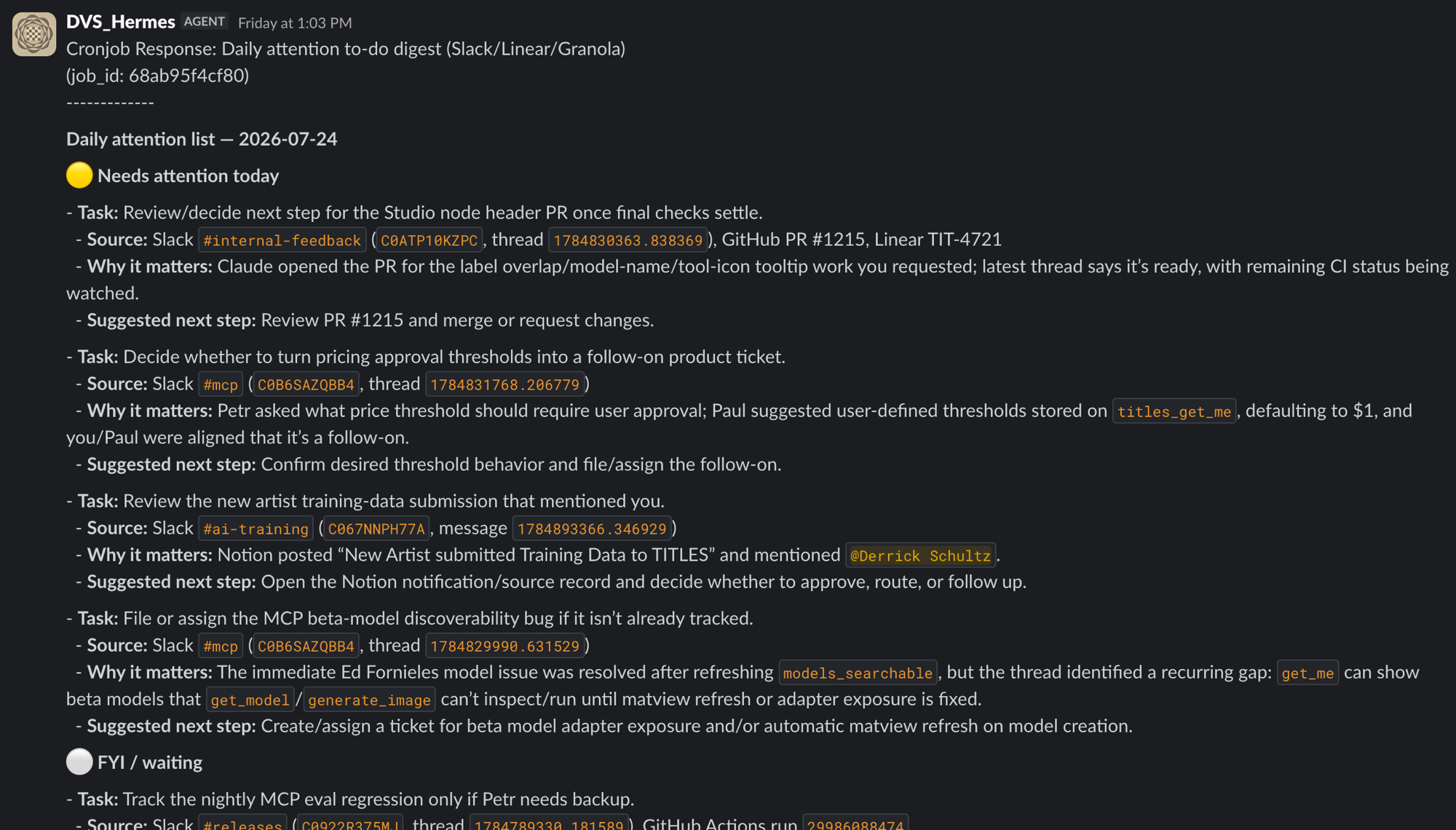
Trigger — 7.30am on weekdays. Input — Slack, email, Linear, and GitHub from the previous 24 hours. Steps — collect the material, ignore items where I am only cc’d, and group the rest by project. Output — one message with items that need attention today, items for information, and a suggested next step. Destination — a Slack message to myself.
It took four rewrites before the agent stopped labeling everything urgent.
How do you check work that ran overnight?
Count the items
For example: 412 files in and 412 files out. A mismatch is an immediate sign to investigate.
Review what was skipped
Ask the agent to set aside items it could not handle and report how many there were.
Spot-check the results
Check one item near the beginning, one in the middle, and one near the end.
Keep it reversible
Move rather than delete. Copy rather than overwrite. Only make it recurring after you have checked it.
scheduled jobs
A scheduled job starts with a fresh session.
It does not remember your earlier conversations or setup decisions. A request like “do my usual morning briefing” is incomplete. The prompt needs to describe the full task.
A daily job creates a recurring cost.
Estimate the month
A job that costs 8 cents per run costs about $2.40 in a thirty-day month. Several small jobs can add up.
Watch the input
If a job reads a growing folder or a longer thread each day, its cost can grow without an obvious warning.
Set limits
Set caps for steps and files. Tell it to stop when there is nothing new to report.
Review it after a week
Check the actual cost and output, then decide whether the task is still worth running.
05
Try it yourself
4.15–4.30 · 15 minutes
working time
Try a text workflow or the task you brought.
Write down the five parts first: trigger, input, steps, output, and destination. For a text task, save a local draft before sending it anywhere.
Run it once by hand. Read the tool calls and look for the choices it had to guess.
Revise the prompt to make those choices clear, then run it again.
Do not schedule or publish it today. Ask questions as you work.
our group project
@Creative_Agent will have its own mailbox.
Last week, it could read the syllabus and answer questions. This week, it will have an email address and a research topic from each of you.
It will continue researching through week six. Later, we will connect it to tools that make things as well as tools that read.
Reply if it writes to you, or let me know in Discord if you would rather not take part.
What would you like me to research this term? One line is enough.
Experimental filmmakers who died before 1980 and never got a retrospective.
web search · 14 sources · read
I started a file for you. I will add to it each week and let you know when there is something useful to read.
For next week
Get one workflow working
Try a short text workflow or the task you brought. Running it by hand is fine. Bring the prompt that worked and a few versions that did not.
Save a reviewed draft
For a text task, keep the local Markdown file or send a reviewed draft to yourself. Do not publish or auto-send it yet.
Check the cost
Run it twice and note the cost. The goal is to develop a rough feel for what tasks cost.
Try another model
Run the same task with a lower-cost model. Is the result worse, or simply different?
Connect one account
Try Gmail through Himalaya, Google Workspace, or Notion if you already use it. Keep tasks read-only or self-addressed this week.
Beyond text
Think about media beyond text you want to generate or work with.
one more thing for next week
Create a titles.xyz account, then send me your username.
Send your username in Discord or by email. Do not send a password.
Where to read more
Models
Configuration — providers, model IDs, compression, the 64K floor · Nous Portal
Email and Google
Himalaya for a mailbox · Email channel to write to it · Google Workspace for the rest
Scheduled jobs
Cron — and the rule that a scheduled prompt has to carry its whole job
Next week, early
This deck
artificial-images.com/agentic-week2 — including the hidden after-class slides
that’s week two
Thank you.
next week
Skills and MCPs
30 August · 2.00pm ET
Questions in Discord, or derrick@titles.xyz · artificial-images.com