Week 4 of 6
Agentic Creativity
Long-running agents and memory
Live on Zoom · 2.00–4.30pm ET
13 September 2026
Derrick Schultz
Course schedule
Week 1 · Aug 16
Introduction to agentic creativity and Hermes Agent setup
Week 2 · Aug 23
Models, text generation, and everyday tasks
Week 3 · Aug 30
Skills, MCPs, and visual capabilities
Sep 6
No class
Week 4 · Sep 13
Memory and scheduled work
Week 5 · Sep 20
Everything is Code; SDLC
Week 6 · Sep 27
Computer Use; Show & Tell
today’s purpose
Build agents that work autonomously for days, weeks, or months.
Save progress between runs. Resume on a schedule without a new request. Review results and correct failures.
Today: understand memory, then build an agent.
2.00–2.10
Introduction and homework check-in
2.10–2.50
Memory and automation: save progress, then keep running
2.50–2.55
Break
2.55–3.10
Inspect the class creator and its research record
3.10–3.50
Build a daily Three.js sketch agent
3.50–4.15
Make two sketches, then schedule
4.15–4.30
Homework, resources, and questions
What happened when your scheduled job ran?
It ran
Open one output. Which instruction did it follow incorrectly?
It broke
Auth expired, a tool call failed, or a path was missing. Where did you find out?
It repeated itself
Did the next run know what the first run already completed?
You stopped looking
After how many days?
Three or four people share. Two minutes each.
01
Memory
2.10–2.50 · 40 minutes
why memory
Stop repeating work and losing corrections across a long project.
Saved information matters only when a later run retrieves it.
The context window holds what the model can read in one turn.
In the window
Instructions, messages, tool results, and file contents read during this run.
Limited capacity
Older material gets dropped or summarized to make room. Details may need retrieval later.
Outside the window
Stored files and transcripts must be retrieved and put back into context.
Storage can hold more material. It does not make the context window larger.
Two routes put saved information back into context.
Hermes internal
MEMORY.md, USER.md, and searchable session transcripts.
External services
Honcho, Supermemory, and other providers store or derive information outside Hermes.
Same final step
The system selects relevant material and loads it into the model’s current context.
Project files
The agent can also read notes, briefs, logs, and histories directly from a folder.
Storage is useful when retrieval returns the right material for the current task.
~/.hermes/memories/
Use memory files for short, durable facts.
MEMORY.md · the agent’s notes · 2,200 characters
Exports for the gallery screen are 3840×2160, sRGB, no watermark.
§
Dusk Index project lives in ~/projects/dusk-index; LOG.md is the primary project record.
# bad entries
User seemed happy with the poster today.
[a 400-word summary of Tuesday]
USER.md · who you are · 1,375 characters
Filmmaker. Works in Premiere and TouchDesigner. Prefers short replies; ask before spending over $2.
§
Eastern time. Available to review outputs in the evening.
# bad entries
Likes art.
About 800 and 500 tokens. When a file is full, Hermes must consolidate or delete entries before adding more. · Hermes: memory
what it saves without asking
Hermes writes memory when you correct it, state a preference, or teach it a fact about your setup.
A background review also runs after each turn and can save quietly. You’ll see a small notice when it does.
Turn on display.memory_notifications: on and review each saved entry.
No. The gallery screen is 3840×2160. It always is. Stop asking.
memory · add · “Gallery screen exports: 3840×2160, sRGB.”
Saved. Re-exporting the three stills now.
Also I hate the word “vibrant”.
memory · add to USER.md · “Avoid the word vibrant.”
saved versus loaded
Saving memory and loading it are different steps.
The automatic memory snapshot is loaded at session start. Saving an entry does not rewrite that snapshot.
The current conversation already includes your correction. Memory tool responses show the saved file.
Use /new to test persistence. Does the next session follow the correction without being reminded?
You: always export 3840×2160.
Agent: saves the preference.
Agent: can follow it immediately.
/new → SESSION B
Updated memory snapshot loads.
Ask for an export without repeating the size.
Check the actual dimensions.
Check what was actually saved.
Pending approval
My agent said it saved a correction. Hours later, it was still waiting for approval.
Verify the write
Check pending approvals and read back the saved entry. Then test it in a new session.
Remove stale rules
Switched from Blender to Three.js? Remove Blender-specific instructions that no longer apply.
Review weekly
Delete duplicates and contradictions. Repeat after changing the project or model.
Automatic writes reduce interruptions; they still need review.
Stored transcripts do not load automatically.
Stored
Earlier messages and tool results remain in ~/.hermes/state.db.
Retrieved
Ask: “What did we decide about the poster colours in August?” Hermes can use session_search.
Loaded
The search result enters the current context. Only then can the model use it.
Named
/new dusk-index makes that session easier to find and continue later.
hermes sessions list · hermes sessions rename · hermes sessions export notes.md
five-minute exercise
Inspect and correct both memory files.
1.Show me everything in MEMORY.md and USER.md.
2. Delete an entry if it is wrong or useless. Keep accurate entries.
3. Add one thing it should have known already. A format, a rule, a word you hate.
4./new, then check it acts on it.
Share one non-private example: the saved entry, your edit, and the result in a new session.
Honcho and Supermemory retrieve information from earlier work.
Honcho
Uses conversations to infer preferences and goals. Example: “prefers sources written by artists.”
Supermemory
Stores notes, documents, and conversations. Finds relevant passages even when your question uses different words.
How both work
Store information → retrieve relevant details → load them into the model’s context.
When to use one
When useful information is spread across many conversations or documents.
Hermes can use one external provider alongside its built-in memory. Try one for a week. Check what it actually saves and retrieves; setup ease is not a quality ranking.
Start with built-in memory. Try Holographic next.
Start here. Short facts and preferences, with no extra memory-service fee or setup.
First free add-on. Select it in Portal: searchable local facts, no account, API key, or extra server.
Free hosted option: automatic fact storage with monthly request limits. Create an account and add its API key.
$5 in free monthly credits, including Hermes. Searches conversations and documents; usage pauses at the limit.
Ongoing free API plan with monthly limits. Choose it for shared cloud memories and files.
Free local software for curated project knowledge. Requires installing a CLI and configuring a model.
Infers preferences and goals. One-time signup credits, then paid cloud usage.
Connects evidence across memories. Cloud starts with trial credits; local use requires a database and model setup.
Free software for a browsable document library. You must run its server and configure models.
Model and hosting costs still apply. Prices checked 12 Sep 2026; links include setup and plans. One external provider at a time.
optional · external memory
Honcho can save inferences as well as conversation history.
A saved inference is Honcho’s conclusion about your preferences, habits, or goals. It is not automatically a fact.
Review the source exchanges. Correct or delete unsupported conclusions.
Choose whether to send your messages to a hosted service or self-host it. You can also skip it. · Hermes: Honcho
hermes memory setup
→ choose honcho → add its key
hermes honcho status
hermes honcho mode hybrid | context | tools
# inspect what it inferred
Show the source exchanges for this conclusion.
# remove a wrong conclusion
honcho_conclude delete_id
Astra can recover details after a context reset.
The problem
Repeated summaries can lose earlier decisions. Astra can return to the original messages and tool results. Read the walkthrough →
1. Save notes
When context runs low, Codex prompts Astra to record progress, decisions, next steps, and references.
2. Reset context
Astra calls new_context. The fresh window receives instructions and pointers to saved notes and earlier windows.
3. Retrieve details
notes.read_file loads notes. history.search_contents and history.read_item recover earlier evidence as needed.
Enable it
Experimental and off by default. Follow the setup instructions, then start a new task.
Owen Gretzinger: implementation walkthrough · OpenAI: setup and eligibility
project files
Save progress so the next run can continue.
1
Save
Write decisions, corrections, results, and open work to a project file.
2
Read
Start the next run by reading the file into the current context.
3
Update
Append the new result and revise instructions when the work changes.
BRIEF.md says what to do. LOG.md records what happened.
Choose how repeated work starts.
/loop 10m <prompt>
Repeat work in the current active chat. Include a stop condition. Do not use it for overnight work.
/heartbeat every 10m <prompt>
Repeat one instruction in an ongoing conversation when idle; state can resume through the gateway.
/goal <outcome>
Pursue an outcome until the judge accepts it or the turn budget ends. It has no interval.
cron
Start fresh scheduled sessions for unattended work. Use cron for the daily sketch.
/loop
A loop re-runs one prompt on a timer while you keep working in the same chat.
Fixed or self-paced
/loop 20m Check ~/renders for new frames. When
24 or more have arrived since last time, make a
contact sheet in ~/renders/sheets and tell me.
Otherwise say nothing.
# no interval: it paces itself
/loop Watch the export queue and tell me when it empties.
fast at first, backs off when nothing changes
Stopping
/loop --until "all 240 frames rendered" ...
a judge checks each reply
/loop status · /loop pause · /loop stop
# the backstop
loops.max_ticks: 100 then it pauses itself
one loop per session. stops with the session.
Every tick uses one full model turn. Loops are for watching something during a work session. Use cron for work that must continue after the session ends. · Hermes: recurring loops
/goal
A goal repeats turns until a judge model marks it done.
Define completion criteria
title sequence in ~/projects/dusk/out
verify: ten JPEGs in out/, each 3840×2160
constraints: use the dusk-painterly model only
boundaries: write nothing outside out/
What happens next
↻ Continuing toward goal (1/20)
turn 2 → 4 more
↻ Continuing toward goal (2/20)
turn 3 → 3 more, sizes checked
✓ Goal achieved
/goal pause · /goal status · /goal clear
The judge is a small, cheap model call. Point auxiliary.goal_judge at a Flash-class model. 20 turns max by default. · Hermes: goals
scheduled jobs · cron
Use a scheduled job for work that runs while you are away.
Ask Hermes in your chosen profile
in America/New_York.
Read [project path]/BRIEF.md and LOG.md.
Complete one task, save its output,
and append the result to LOG.md.
Show the job ID, next run time,
and where I will receive the result.
Test, enable, and stop
2. Verify the profile and repeat schedule.
3. Test the paused job once.
4. Inspect its output and saved record.
5. Resume it after the test passes.
Use Pause to stop future runs.
Keep the cloud gateway running.
Each run starts a fresh session. Put file paths and complete instructions in the job. Your laptop can be closed when the agent runs in the cloud. · Hermes: scheduled jobs
Break
Choose a visual theme for a daily sketch.
2.50–2.55 · 5 minutes
02
Inspect the class creator
2.55–3.10 · 15 minutes
Two cron jobs run the creator.
Every 12 hours
Research the next class topic. Post a digest and images to #agent-research; update the Google Doc archive.
Every 6 hours
The agency desk reads new topics from the Doc, works through its queue, and posts finished media to #agent-output.
Discord is delivery
This creator profile posts through a script. It does not read Discord messages.
No new request needed
Each run reads standing instructions and saved state, does the next work, reports, and exits.
The guide calls the six-hour cron job a “heartbeat.” It does not use the /heartbeat command. · Class Discord
agency desk · one topic
Research becomes a creative brief, then media.
01 · research
Add evidence
Read the class digest. Run 3–6 new searches and extract 2–4 useful pages. Save sources and findings.
02 · brief
Choose a direction
Identify an idea or contradiction in the research. Write one prompt per asset that develops it.
03 · output
Generate and publish
Use TITLES for generation. Package the files, record costs, publish selected assets, and attach media in Discord.
The brief must express an idea from the research, rather than simply depict its subject.
Open the document the creator reads and updates.
Topic source + archive
Open Creative Agent Research →
It holds class topics, dated digests, source URLs, and image references.
Find this entry
The hands the machine forgets · research dated 9 September. The agency desk processed it on 12 September.
Inspect the evidence
Read its summary, follow one source URL, and look at the image references. Compare an earlier report with a later revisit.
How it connects
A Google service account reads and writes the Doc. ingest_doc.py extracts topic headings; a separate script syncs the archive.
Open Creative Agent Research → · Screen-share the document.
Each store has a specific job.
Google Doc
Shared project knowledge: topics, research digests, sources, and image references.
Local files
Work and progress: queue, research, briefs, packaged outputs, completion records, and costs.
Supermemory
Lessons, decisions, and rules: what changed and why. Costs and queue counts stay in files.
Standing instructions
The project’s AGENTS.md is read first on every run. config.yaml holds defaults.
The creator and default profiles share the hermes Supermemory container. Stored information still has to be loaded into context.
/opt/data/agentic-creativity-agent/
Each stage leaves a record for the next run.
Queue and progress
↓ ingest_doc.py
skip topics already in the ledger
queue/pending/
↓ take the oldest topic
queue/in-progress/
↓ finish and record delivery
queue/done/
state/ledger.jsonl · status and results
state/spend.json · per-asset costs
Work saved for each topic
briefs/<topic>.md
outputs/<topic>/
image/ · video/ · audio/ · found/
manifest.json
note.md
manifest: files, model, costs, IDs,
publication status, source URLs
note: why the agent made this work
After a crash, recover completed generations from TITLES execution history before making them again.
Example: “The hands the machine forgets.”
Research finding
The human brain gives hands a large sensory representation. Image models frequently produce malformed hands.
Creative idea
Combine those findings: oversized hands that develop extra fingers or dissolve into noise.
Asset briefs
Image: a distorted homunculus. Video: a praying hand corrupting and reforming. Audio: narration. Found footage: a CC0 montage.
Inspect the record
Open the topic’s research/ and briefs/ files, then its outputs/ manifest and explanation.
Documented example from the creator guide · processed 12 September 2026.
posted output · video · 5 seconds
The face fragments, then becomes a metallic bust.
A pale face sits inside separated reflective fragments. The moving image becomes a metallic bust.
Look first: what changes in the material, the face, and the silhouette?
Then ask: which research source influenced this result?
Example 1 from the September 8 post · Descriptive heading, not an artwork title.

Play the 5-second clip on X → Watch once before interpreting it.
posted output · still
What would you keep? What would you correct?
A white sculptural head repeats eyes and faces across its surface. Portrait insets and distorted text surround it.
Choose one visible feature worth developing and one thing you would change.
Write the correction: is it for this image, the project brief, or the agent’s reusable method?
Example 2 from the September 8 post · The starting research topic is not identified in the post.

Name the visible feature behind each comment.
posted output · video · 18 seconds
Identify the visual connection between these images.
The clip moves between different images, including a sculptural bust and a person filming into mirrors. On-screen text reads “surface-vs-mechanism.”
Watch once. Name the connection you see, then the evidence you would need to understand its choices.
Example 3 from the September 8 post · Open the post to play the clip with sound.

Play the 18-second clip on X → The run record can show its sources, prompt, model, and output path.
The creator publishes and records what it spends.
Public output
Generated assets go to the TITLES public feed. For images from the same prompt, it publishes the strongest and records the skipped duplicate.
Discord output
discord_post.py downloads and attaches media in #agent-output. Private canvas links are not shared.
Spending
Actual execution costs go into state/spend.json. The $2 topic budget is a soft target; the global spending cap is disabled.
Failures
Honor price-confirmation requests. Record unknown costs honestly. Retry once, then mark the failure and report it.
Guide snapshot · 12 Sep 2026: 38 topics completed, 1 cap-blocked dry run; about $23.62 in recorded spend.
What broke in my agent.
Disk filled up
The 5.9 GB host ran out of space. Large source downloads filled it. Check free space; clear temporary downloads after use.
Memory contradicted itself
73 duplicate or conflicting records. Keep completion status and costs in files; save lessons in Supermemory.
Cost log broke
Wrong script arguments shifted the fields. Check a new record immediately after writing it.
Schedule ran once
12h created a one-off job. Verify that the saved schedule actually repeats.
Run crashed midway
TITLES still had the finished outputs. Recover those executions and their costs before generating again.
Creator failure log · 12 September 2026. For your own agent, record the failure, its cause, and what you changed.
Schedule maintenance, too.
Back up actual files
An expired media URL cost me another generation. Copy code, media, and logs off the agent host.
Check weekly
Report failed jobs, disk space, stale memories, and missing cost records. Propose fixes.
After an update
Test one run. Confirm tools, credentials, output delivery, and the next scheduled run.
Before travelling
Test remote access and restore one backup. A backup you cannot restore is unverified.
03
Build your agent
3.10–3.50 · 40 minutes
step 1 · plan before building
Build an agent that makes a new Three.js sketch every day.
Plan a daily Three.js agent for Nous Cloud. Research expanded cinema: projection, rephotography, and remixing. Make related studies with meaningful variation. Save runnable code, a short MP4, and a run record. Ask questions before building.
Use this theme or choose your own. Plan in Cloud Agent or your preferred desktop agent.
Move the plan into Cloud Agent.
Write handoff.md
Include the brief, cloud environment, project paths, memory choice, delivery, budget, and unresolved questions.
Transfer it
Upload through Files, or paste the contents into Chat in your chosen profile.
Confirm receipt
Ask Hermes to read it, show its saved path, and resolve the remaining questions before building.
step 2 · Nous Cloud Agent
Use your existing profile or create a new one.
Use an existing profile
Select it from the menu at the top left.

Create a new profile
Open Profiles → Create. Give it a name.
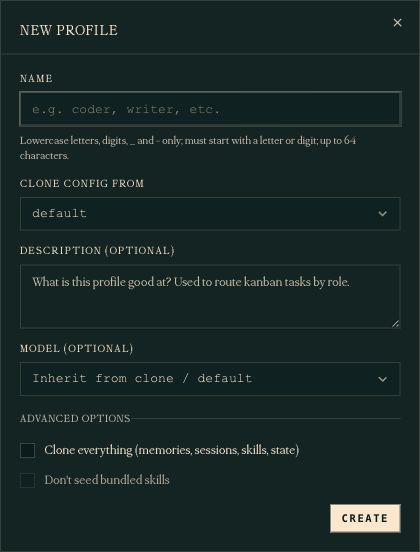
The cloud host is the machine. A profile holds its own configuration and sessions. A subagent is a delegated worker; you do not need one for this lab.
Keep the project in one folder.
Memory
Ask Hermes to check memory in your chosen profile. Start with the built-in option.
Project rules
Save the theme, constraints, and review criteria in BRIEF.md.
Run history
Save each date, idea, code path, preview path, test result, and correction in LOG.md.
Sketch archive
Keep dated studies inside one project root. Ask Hermes to show the exact paths; preserve earlier versions.
BRIEF.md and LOG.md are files you create for this project. Back up the folder, including actual media.
Nous Cloud Agent
Open Config → Memory.
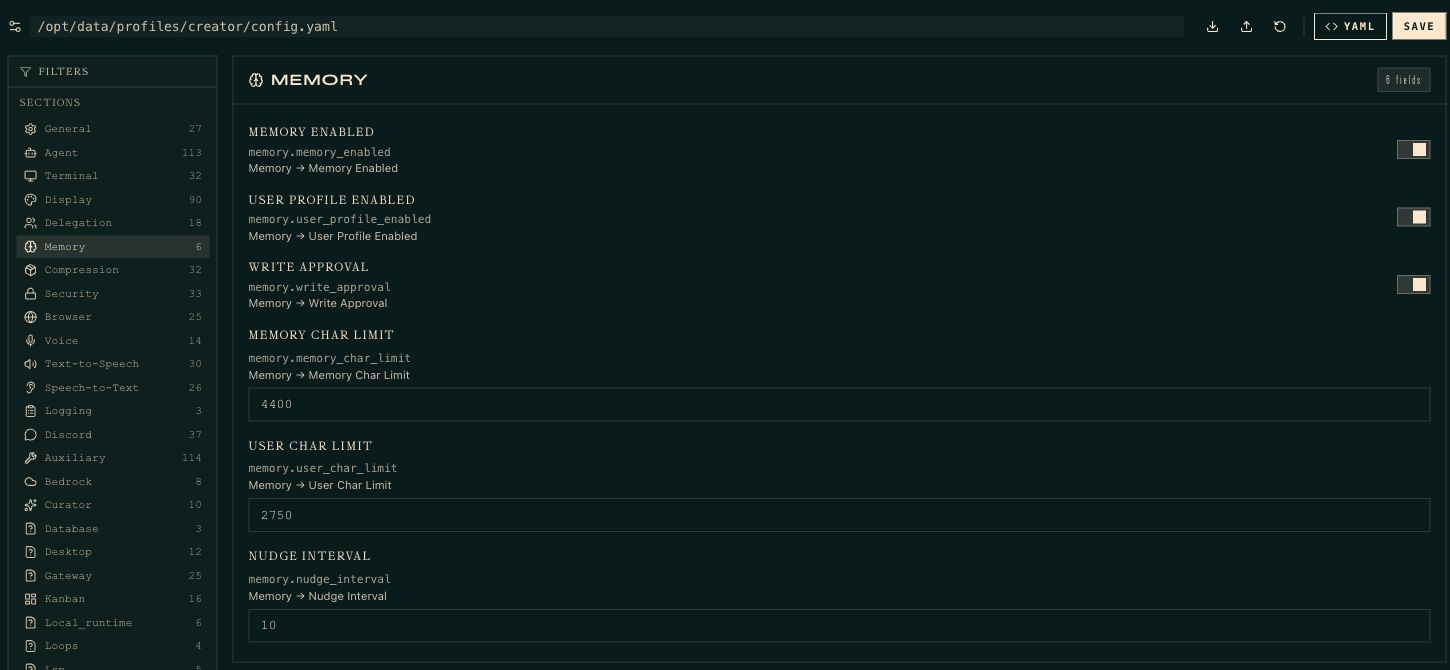
This screen controls built-in memory. Approval is enabled in this screenshot: check pending writes if you use it. You do not need to copy these limits.
External providers are under Plugins.
Keep setup short
Built-in memory is enough for this lab. Add an external provider when you need it.
Plugins → Memory Provider
Choose a provider. Complete its dependency and credential setup, then save.
Verify in this profile
Ask Hermes to save a harmless test fact to that provider. Start a new chat and retrieve it.
Check the evidence
Ask which provider and saved record it used. A claim to remember is not proof of retrieval.
Define what counts as a new, finished sketch.
Visual direction
For the class example, research written accounts of expanded cinema. Translate an idea into geometry and motion.
Variation
Make related studies. Improve a previous idea or try a bigger change within the theme; avoid unrelated daily outputs.
Deliverables
Save runnable code, a short MP4, and a sentence connecting the sketch to its research.
Completion
Check rendering, animation, resizing, and browser errors. Record a failed test as a failure.
Optional: connect Drive in your chosen profile.
Your Google account
Ask Hermes to use its google-workspace skill. Follow the API setup and browser OAuth steps in this profile.
The class setup
The creator uses a service account. Its credentials stay on the agent machine; the chosen Doc is shared with its bot email.
Verify read
Ask the profile to open your target document and quote one dated heading.
Verify write
Append one test note to your document and read it back. Confirm both operations before scheduling.
Local files remain the quickest lab option. · Google Workspace setup
Choose how you will review each sketch.
Start in Cloud Agent
Use Chat to inspect the run report and Files to find the saved code and preview.
Open the result
Start with a downloadable MP4 and source code. Watch the motion; a screenshot cannot demonstrate animation.
Optional hosting
A public interactive preview needs separate hosting. Skip that setup for the first run; add it later.
Test access
Open the result from your own browser before scheduling. A cloud machine’s localhost URL is not your laptop’s localhost.
work time · 25 minutes
Prepare the agent for its first sketch.
1. Read the handoff in your chosen profile.
2. Check memory.
3. Save your visual brief and run log.
4. Choose where the code and previews will live.
5. Ask Hermes to prepare a reusable Three.js starter.
Work in Nous Cloud Agent. Ask for help when setup blocks you.
04
Make and test sketches
3.50–4.15 · 25 minutes
Set up one working Three.js starter.
Ask Hermes
Create a minimal Three.js project with a scene, camera, renderer, and one animated object.
Keep it reusable
Use npm and Vite. Save the dependency lockfile and commands for running and building the project.
Verify the browser
Ask Hermes to open the starter, check for errors, and save a screenshot. Resolve browser or WebGL setup failures first.
Verify your access
Have Hermes export a short MP4. Download and play it; confirm that the animation is visible.
Three.js installation · Set this up once; reuse it on later runs.
Make the first sketch manually.
Read + choose
Read the brief and recent log. State one visual idea for today’s sketch.
Write + test
Build on the starter. Run it in a browser; inspect the animation, resize behavior, and console.
Save
Keep the source, dependencies, build, and preview in a dated folder. Preserve earlier sketches.
Record + review
Append the idea, paths, and test results to the log. Open the sketch yourself.
Save a correction and test it in a fresh chat.
Inspect
Open the sketch and its preview. Choose one specific change: slower motion, fewer objects, or a fixed camera.
Correct
Add the rule to BRIEF.md. Record the reason in LOG.md.
Restart
Start a new chat in the same profile. Ask it to read both files and make another sketch.
Compare
Check that the new sketch follows the correction and differs from the first. Keep both versions.
daily schedule · ask Hermes in Cloud Agent
Schedule the tested process for every morning.
Read [absolute project path]/BRIEF.md and LOG.md.
Choose a new idea based on the last seven sketches.
Create one Three.js sketch in a new dated folder.
Run browser checks and save a short MP4 preview.
Append the idea, file paths, and test results to LOG.md.
If today is already complete, report its location and stop.
On failure, record the error; do not mark it complete.
Return the result location and a short report.
Ask Hermes to show the saved schedule, profile, timezone, output destination, and next run time.
Nous Cloud Agent
Cron → Create: choose the profile and daily schedule.
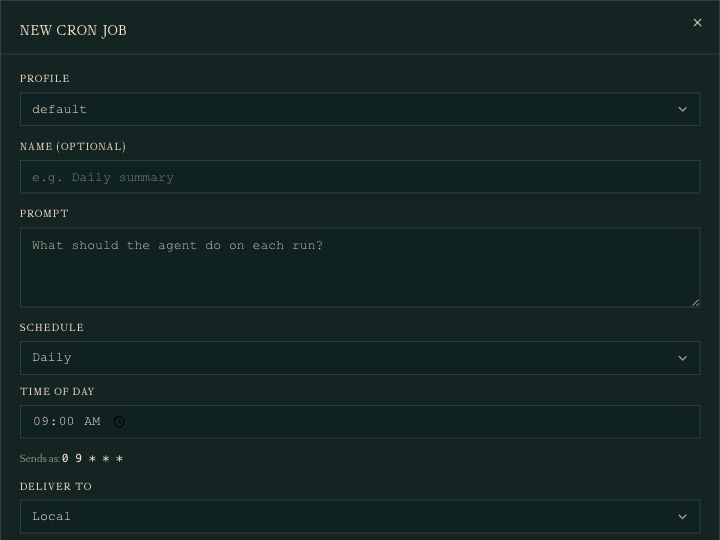
The form defaults to default, even when the sidebar shows creator. Select your intended profile and verify its timezone. This screenshot is an unsaved example.
Verify the job in Nous Cloud Agent.
Inspect
Open Cron. Confirm the chosen profile, daily repetition, timezone, and next run time.
Test once
Ask Hermes to run the paused job once. Check its run history, saved sketch, preview, and report.
Resume
Enable the job after the test passes. Verify that the cloud agent’s gateway is running.
Check tomorrow
Confirm a timed run creates a new sketch. Ask Hermes to pause the job if it fails or repeats work.
Your laptop can be closed; the cloud agent must remain running.
Each scheduled run needs its own instructions.
Separate context
Do not assume a scheduled job sees your latest chat. Give it the brief, log, and absolute paths.
Identify the run
When reporting a problem, include the job name, run date, and output path.
Avoid overlap
Jobs on one host share resources. Stagger them; leave time for slow runs and retries.
Respect dependencies
If one job needs another’s output, verify that output is complete before starting.
Nous Cloud Agent
Read the schedule and know how to stop it.

Filter to your profile. Check repeat and next run. Right-side controls: Pause, Trigger now, Edit, Delete. Trigger now starts real work; use it only when ready to test.
optional · after the daily job works
Track each sketch on a kanban card.
Ready
Cron creates today’s card with the task, profile, file paths, and completion criteria.
Running
The gateway starts the assigned profile. It reads the brief and log, writes the sketch, and tests it.
Review
The agent attaches code and preview locations. You open the animation and accept it or request changes.
Done
You accept the sketch. Its code, preview, and run record remain saved.
Blocked
The agent records a missing dependency, failed browser setup, or decision it needs from you.
The board tracks work and status. BRIEF.md and LOG.md retain creative direction and lessons. One profile can handle every card.
ask Hermes · then open Kanban
Have cron create cards for the agent to work through.
Assign its cards to [my chosen profile].
Require human review before marking a sketch done.
Replace the existing daily sketch job with card creation.
Use a date-based idempotency key in my timezone.
Each card must include the brief, log, starter, output
folder, browser checks, and a request for human review.
Create one test card. Show it moving from ready to
running to review. Wait for my feedback.
Keep only one daily producer to avoid duplicate sketches. Human-only review requires kanban.review_dispatch: false. · Hermes kanban setup
Separate a sketch revision from a lasting rule.
Revise this sketch
Comment on the card: “Keep the geometry, halve the animation speed, and remove camera movement.” Return it for revision.
Change future sketches
Ask the agent to save “Use a fixed camera” in BRIEF.md and record your reason in LOG.md.
Verify
Open the revised animation before accepting the card. Check tomorrow’s sketch against the saved rule.
Stop work
Pause cron to stop new cards. Block queued cards separately; pausing the schedule does not cancel existing work.
For the first week, keep creation and testing on one card. Split them into dependent tasks only when you need separate workers.
Limit what one daily run can do.
One sketch
Use procedural geometry and animation. No paid image or video generation is needed; model usage still costs.
Bounded repairs
Allow at most two repair attempts. Save the error and stop if the sketch still fails.
Preserve work
Never overwrite an earlier sketch or delete its run record. Keep unfinished runs marked as failed.
Review daily
Check the actual animation and log. Pause repeated failures or unexpected usage.
what keeps it going
A schedule starts the next run. Saved knowledge helps it continue.
Show the smallest working version.
Profile
Your chosen profile with memory configured.
Sketches
Two runnable sketches and previews, with the second following a saved correction.
Record
The brief, run log, dated folders, and browser test results.
Schedule
A verified daily job with a timezone, result destination, and pause method.
05
Homework and questions
4.15–4.30 · 15 minutes
Run your agent for a week.
Choose a cadence
Three.js, p5.js, poetry, or another task. Schedule only as often as your budget and review time allow.
Correct Wednesday
Save one correction in the brief. Record why. Confirm the next output follows it.
Keep the archive
Preserve runnable code, previews, and run records for every day, including failures.
Bring two outputs
Show one before the correction and one after, alongside the changed instruction.
For Week 5, bring one small tool you wish existed for this process.
Keep learning · deeper reference follows the closing slide
Memory
External memory
Context and files
Skills and prompts for GPT-6 Astra · Codex memories · Effective context engineering
This deck
that’s week four
Run the job daily. Review its results. Save corrections.
next week
An introduction to agentic coding
20 September · 2.00pm ET
Questions in Discord, or derrick@titles.xyz · artificial-images.com
Appendix
Optional reference
Memory research, troubleshooting, and advanced automation
This survey groups memory by its function.
Factual
Stores preferences, setup facts, and project rules. Hermes: USER.md, MEMORY.md.
Experiential
Stores reusable methods from prior work. Hermes: skills, and agent-created skills.
Working
Stores current plans, partial results, and remaining tasks. Hermes: the session, and whatever file it’s keeping notes in.
Hundreds of memory papers in 2025 alone. This split is from the survey that tried to sort them. · Memory in the Age of AI Agents (Dec 2025)
Four memory methods relevant to Hermes.
MemGPT · 2023
Treat the context window like RAM and everything else like disk. Let the model page its own memory in and out. Became Letta.
Generative Agents · 2023
Stores events, then periodically derives higher-level conclusions. Honcho does this about you.
Sleep-time compute · 2025
Processes memory between user turns. Hermes’s background review and the curator.
Context engineering · 2025
Manus: use the file system as memory, keep a todo.md, rewrite it every step. Anthropic: a memory directory the agent reads before it starts.
Enable a method only when it solves a specific memory problem.
review memory changes
Review, approve, edit, or delete saved memory.
Approve every write
/memory approval on
/memory pending
/memory approve <id>or all
/memory reject <id>
# or in config.yaml
memory:
write_approval: true
Review saved memory and skills
hermes journey
timeline of every memory + skill it saved
hermes journey edit <node>
hermes journey delete <node>
# or just open the files
open ~/.hermes/memories/
Turn approval on when the agent keeps saving wrong assumptions. Turn it off once you trust what it picks up.
where the log lives
Store the log where you and the job can access it.
In the project folder or a private repo
Start every session by reading LOG.md and plan.json.
Before you finish, append a dated entry to LOG.md:
what you did, what you decided, what is still open.
Never delete earlier entries.
# a cron job that reads its own log
hermes cron create "daily at 7am" \
"Read ~/projects/dusk-index/LOG.md, do the next
open item in plan.json, append to LOG.md" \
--continuity
# the repo is the backup (Week 2)
git add LOG.md plan.json && git commit -m "day 4"
In Notion or a Google Doc
hermes skills → productivity/notion, google-workspace
# Notion: one page per project, append-only
export NOTION_API_KEY=ntn_…
share the page with the integration in Notion first
Append today’s LOG entry to the Dusk Index page.
# Google Docs
$GAPI docs append DOC_ID --text "…"
$GAPI drive upload out/selects.jpg --parent FOLDER_ID
# or any MCP from Week 3
/mcp add notion
Choose one primary record: local files or a connected document. Every run must read and update it. Keep any additional copy in sync.
When output quality drops, check the runtime.
Wrong model
A provider changed underneath you. /model shows what’s actually running.
Full context
Long sessions degrade. /usage to check, /compress to fix, /new to start clean.
Stale snapshot
A new session tests whether a saved correction persists. In this session, check the instruction and tool results too.
Lost a tool
A skill or MCP got disabled. /skills · /tools list · /reload-mcp
Check these causes before deciding the model got worse. · Hermes: “My agent feels dumber”
check scheduled runs
Inspect every scheduled run.
What happened
hermes cron runs <job> --limit 10
hermes cron incidents
hermes cron doctor
# every run's full output
ls ~/.hermes/cron/output/<job>/
Make runs consistent
--model <name> --provider <name>
# load a method instead of pasting it
--skill visual-critique
# give it the project folder
--workdir ~/projects/dusk-index
hermes cron pause <job>when you go on holiday
Three failures in a row and Hermes nudges you. Don’t wait for that. Read the output folder on day one and day two.
/goal · in practice
Write completion criteria that another person can verify.
The judge reads your verify: line, not your intentions. “Ten good stills” is unjudgeable. “Ten JPEGs, 3840×2160, none with text” is verifiable.
/subgoal add extends the contract mid-run without restarting. /goal gate add attaches a script that must pass first.
A saved goal can be resumed later. That does not mean work continues while its machine sleeps. It never creates a cron job or a card. It is this conversation, kept going. · Hermes: persistent goals
/goal Build a contact sheet of the Dusk Index selects. verify: one JPEG at out/selects.jpg, 6 across, every file in selects/ appears once. boundaries: read selects/, write only out/.
↻ Continuing toward goal (1/20). 14 of 23 placed; two files are HEIC and need converting.
/subgoal add filenames under each thumbnail
↻ Continuing toward goal (3/20). Converted, labelled, 23 of 23 placed.
✓ Goal achieved. out/selects.jpg, 4 rows of 6.
kanban
A kanban board tracks tasks, assignments, and progress.
Each card has instructions and an assigned profile. The gateway checks for ready cards every minute and starts the assigned profile.
A card can wait for another card. When the required card is done, the next card moves to ready with the earlier result attached.
Kanban supports multiple agents and survives restarts. You can move, comment on, or block a card from your phone. · Hermes: kanban
triage → todo → ready → running → blocked → review → done
A CARD
title Research three title-sequence directions
body what done looks like, where to write
assignee researcher a profile name
parent t_a1b2 waits for this card first
WHO MOVES IT
the dispatcher, the worker, or you
hermes dashboard → Kanban tab
kanban · a studio board
Create three dependent cards and assign one profile to each.
Set up once
hermes kanban boards create dusk-index --switch
hermes gateway start the dispatcher lives here
# the chain
hermes kanban create "Research 3 directions" \
--assignee researcher --json → t_r1
hermes kanban create "Make 2 stills per direction" \
--assignee creative --parent t_r1 --goal --json
# save the returned ID as t_s1 below
hermes kanban create "Critique and pick 3" \
--assignee critic --parent t_s1 --skill visual-critique
Watch and steer
hermes kanban show t_s1
hermes kanban runs t_s1 every attempt, with its summary
# from your phone, mid-run
/kanban comment t_s1 "less magenta"
/kanban block t_s1 "wait for my selects"
/kanban unblock t_s1
# cron + kanban: a card a night
hermes cron create "daily at 2am" \
"hermes kanban create 'Nightly stills' --assignee creative"
--goal on a card runs the judge loop from the goals example inside the worker. Without it, a card is one shot. Workers on a cheap model, you and the orchestrator on the good one.
delegation
Delegate independent tasks to workers and collect their summaries.
The agent can start up to three subagents at once. Each receives a new context and the same tools. Each returns a summary.
They do not receive the current conversation or write to memory. Put every required instruction in the delegated task.
Keep the planner on a strong model and pin delegation.model to a cheap one. · Hermes: delegation
“Research three directions for the title
sequence and make two test stills for each.”
PLANNER(your main model)
delegate_task × 3
↳ worker: brutalist type
↳ worker: hand-drawn
↳ worker: found footage
BACK TO YOU
three summaries · six stills · one contact sheet
Every automated turn can add cost.
Every tick is a full turn
A loop every 5 minutes is 288 turns a day. Ask whether an hour would do.
Cap it
loops.max_ticks (100) and goals.max_turns (20) exist so an unattended session can’t run forever. Leave them on.
Cheap where it counts
Judge, background review, and workers on a Flash-class model. Use the main model for subjective review.
Zero-cost checks
--no-agent --script runs a shell script with no model at all. Empty output means no message.
Week 2’s rule still holds: run it twice by hand and read the cost before you schedule it.
self-authored methods
Review every skill the agent creates or changes.
How the agent creates skills
skill_manage · create contact-sheet-review
# or when you ask
/learn turn what we just did into a skill
# gate it, same as memory
skills:
write_approval: true
Inspect saved skills
hermes journey
skills and memories on one timeline
# protect the ones that matter
hermes curator pin contact-sheet-review
# and read one
cat ~/.hermes/skills/contact-sheet-review/SKILL.md
A saved skill can change future runs. Read it before approving the change.
Archive unused skills to keep the active set relevant.
The curator
Runs about weekly, when the agent has been idle two hours. Skills unused 30 days go stale; 90 days, archived.
It can merge
With curator.consolidate: true, a model pass combines near-duplicate skills. Off by default. Leave it off for now.
You can veto
hermes curator pin protects a skill. hermes curator rollback undoes a run. Every run leaves a REPORT.md.
Memory is separate
The curator doesn’t touch MEMORY.md. That file has a character limit. Hermes chooses which entries to remove when it is full.
Decide which skills may be archived. · Hermes: curator