Week 5 of 6
Agentic Creativity
Writing and testing code with an agent
Zoom · 2.00–4.30pm ET
20 September 2026
Derrick Schultz
Course schedule
Week 1 · Aug 16
Introduction and Hermes Agent setup
Week 2 · Aug 23
Models, text generation, and everyday tasks
Week 3 · Aug 30
Skills, MCP, and image generation
Week 4 · Sep 13
Memory, scheduled jobs, and ongoing projects
Week 5 · Sep 20
Writing and testing code with an agent
Week 6 · Sep 27
Computer use and show and tell
Today: describe a small tool, have the agent build it, and test the result.
Today’s schedule
2.00
Review your Week 4 scheduled job
2.20
Code, creative processes, and agentic development
3.10
Break
3.15
Lab: build Frame Stack, one Compound Engineering step at a time
4.05
Let the agent use the tool you built
4.15
Homework, presentation prep, and questions
Review your scheduled job
Useful output
Show one result you’d keep. How does it meet your brief?
Unexpected output
Show one surprise. Did it reveal a problem or suggest a useful change?
One correction
What did you change? Compare a result before and after.
Repeated behavior
What worked consistently? What failed more than once?
Tool idea
Name one task a small tool could help you do.
Post your tool idea in the chat. You’ll use it in the lab.
today’s question
Can the entire creative process be encoded in an agentic system through code?
Include deciding what to make, evaluating results, and changing direction.
Good code and the creative process
This week, you’ll learn how to write better code with agents. The larger question is how to describe and implement a creative process: its actions, context, judgments, and revisions.
How much can we make explicit? What can an agent discover through doing? What still depends on the artist?
01
Code, decision making, and verification in the creative process
2.20–3.10 · 50 minutes
Marc Andreessen · 20 August 2011
Why Software Is Eating the World
Fifteen years ago, Andreessen argued that software was becoming the basis of businesses across the economy. Entire industries were reorganizing around software and online services.
He also identified a shortage of people with the skills to build these systems. Coding agents let us revisit who can build software and what processes it can carry out.
from description to execution
Use an agent to turn a process you can describe into code.
Specify the inputs, actions, decisions, and expected result. Ask the agent to implement the process, then test its behavior.
Making art with code can involve discovering what you want.
Intention
You can begin with a question, a constraint, or a rough direction.
Experiment
Write or change a process, then inspect what it produces.
Selection
Choose what to keep and what deserves more work.
Revision
The results can change both the code and your initial intention.
A coding agent can help translate each new direction into an implementation. You can begin before you know the final result.
A program can ask a model to make a judgment.
Code
Defines when a decision happens, what information is available, and what happens next.
Model
Interprets that information and proposes a choice or revision.
Feedback
Records what happened so the result can inform later decisions.
You can implement this process without writing an explicit rule for every possible judgment.
Reminder: Context is everything
As an artist, you make choices without explaining every decision out loud. Your experience, taste, references, and intentions inform those choices.
An agent needs access to that context. Explain what you want, show examples, and describe why you keep one result or reject another.
a proposed artistic system
Consider the decisions across an entire creative process.
01
Set a direction
Choose a question or intention to pursue.
02
Explore
Produce alternatives and decide what to try next.
03
Evaluate
Decide which results are worth developing and why.
04
Revise
Change the method or goal, or decide the work is finished.
These decisions can be shared between a person, a model, and fixed rules. Revising the goal can start the process again.
Define what the system uses to judge its work.
Your choices
Goals, constraints, examples, and feedback describe what matters to you.
The model
Patterns learned during training affect what it proposes and how it evaluates the results.
The system’s history
Saved results and evaluations can provide context for subsequent choices.
Saved feedback can change later choices without retraining the model. Decide whether the system can also revise its evaluation criteria.
Richard Sutton · 2019
The Bitter Lesson
Sutton argues that general methods using search and learning have repeatedly surpassed approaches built around expert knowledge as more computing power became available.
For an artistic system, this raises a design question: which decisions should be prescribed, and which could develop through exploration and feedback?
The essay concerns progress in AI research. It does not establish that creativity can be fully automated. · Read Sutton’s essay (PDF)
Explore possible solutions and evaluate them.
Learning
Improve performance using data or experience.
Scaling
Use more computation to extend these methods.
example 01 · computer vision
A broadly trained vision model can serve many tasks.
Task-specific systems
Engineers often designed features, collected labeled data, or trained models around a particular problem.
General pretraining
CLIP (2021) learned relationships between images and text from a large, varied dataset.
A new task
For a new classification task, describe the categories in words. The same model scores how well each description matches an image.
Example
Change the categories from “portrait / landscape / still life” to “photograph / painting / sketch.” Reuse the model without training a new classifier.
This is zero-shot classification. Check the model on your own images; performance varies across tasks. · CLIP: research and limitations
Before and after: how you define the task
before · HOG person detector · 2005
Design features and train a classifier.


edge features ↓
not a person
New task: train a different classifier; the features may also need to change.
after · CLIP · 2021
Reuse a model trained on images and text.

“A photo of a car”
“A photo of a bird”
Text encoder ↓
dog
New task: change the label descriptions and reuse the pretrained model.
Simplified workflows, not an accuracy comparison. · Dalal & Triggs, 2005 · Figures 1 and 6 · Radford et al., 2021 · Figure 1
example 02 · agent tools
Bash lets an agent assemble and execute its own solution.
Custom tools
Each tool exposes actions its author has implemented. A new operation may require additional tool code.
Shell access
Bash is a command-line shell. An agent can combine installed programs, write scripts, run tests, and use errors to revise its approach.
A reported result
Vercel’s d0 turns questions into database queries. Replacing most custom tools with shell access to documented files improved success from 4/5 to 5/5 in its five-query test.
Vercel kept a separate tool for running database queries. Clear goals and verification still matter. · Vercel’s case study · mini-SWE-agent: coding with Bash alone
Before and after: how d0 finds its context
before · specialized tools
Custom tools select and prepare context.
Custom tools, grouped by purpose
ExecuteSQL→Database→AnswerDevelopers maintain the tools and the rules for retrieving context.
after · Bash and files
The agent reads context through Bash.
ExecuteCommandls · find · grep · cat
ExecuteSQL→Database→AnswerThe agent chooses commands to explore well-documented source files.
Simplified from Vercel’s d0 case study. The database query tool remains separate from Bash. · Vercel · 22 December 2025
last week’s Three.js bot
So can an agent be
its own creative loop?
probably not yet.
Last week’s Three.js bot


why coding helps
Start by building and testing parts of the creative process.
Use code to generate variations, inspect results, record judgments, and revise the next attempt. Check how each step works and where it still needs your input.
from task to script
Describe the process, then test the code.
01
Choose a task
Pick a repeated process with clear inputs and outputs, such as resizing a folder of images.
02
Describe it
List the steps, the expected result, and what should happen with missing or invalid input.
03
Build and test
Ask the agent to write a script. Run it on a small sample and compare the output with your description.
04
Reuse it
Save the working script and its run command. Schedule it if the task needs to repeat automatically.
A script needs a running computer or hosted environment to run on a schedule.
the development process
Plan the work, build it, check it, and record what you learned.
These steps still apply when an agent writes the code.
From SDLC to ADLC
SDLCSoftware development life cycle
ADLCAgentic development life cycle
Plan
People turn requirements into a design and a task list.
You provide goals, constraints, and context. The agent proposes a plan for you to review.
Build
Developers write code and carry out the implementation.
The agent writes code and uses tools. You review its choices and redirect the work.
Verify
People and automated tests check the software. Developers fix failures.
The agent runs checks and uses failures to revise its work. You inspect the evidence and test the result.
Document
People record decisions and fixes for the team to reuse.
Save decisions and fixes as project instructions, skills, and tests the agent can use on later tasks.
Here, ADLC means applying agents throughout software development. People still own requirements, release decisions, and maintenance. · SDLC · Agentic coding practices
four steps
Give each step a clear result.
01
Plan
Define the inputs, outputs, and tests. Review the agent’s proposed approach before it builds.
02
Build
Ask for one working version. Check that the agent stays within the task you described.
03
Verify
Have the agent run tests. Try the tool yourself with normal, empty, and invalid input.
04
Document
Save the setup instructions, problems, and fixes in the project. Ask the agent to read them next time.
The agent can help with all four steps. You decide whether the result meets your needs.
verification in code
Check what the code actually does.
Expected behavior
Define the result you expect, including what should happen with missing or invalid inputs.
Automated tests
Unit tests check individual pieces of code. Other tests check how those pieces work together.
Direct observation
Run the actual program. Use its interface and inspect its outputs, screenshots, or recordings.
Revision
Compare the evidence with the expected behavior. Use mismatches to guide changes, then check again.
Passing a check supports a specific claim about behavior. It does not prove the whole program is correct. · Lauren Tan · The Complete Guide to pstack, Pt. 1
verification in a creative process
A creative agent needs a way to evaluate what it makes.
Observation
Inspect the actual output: use vision for images, listening for audio, or reading for text.
Criteria
Compare it with the brief, references, and desired qualities such as composition, pacing, or tone.
Judgment
A model or a person can compare versions and explain a preference. Aesthetic evaluations depend on the criteria.
Next decision
Keep, revise, or discard the result. An unexpected outcome may also justify changing the goal or criteria.
Skills can guide the development process. We’ll use Compound Engineering today.
Compound Engineering
Every’s collection includes planning, implementation, review, and documentation skills. /ce-compound records a solved problem for future reference. Repository
pstack
Lauren Tan’s workflow collection. poteto-mode selects a process for the task, coordinates the work, and checks results. Community port for Claude Code and Codex
Matt Pocock’s skills
grilling questions a plan, tdd guides development through tests, and domain-modeling defines the project’s concepts and terms. Repository
All three are plain markdown you can read. Compound Engineering is the one for today because each step is a separate command you run yourself.
LaB
Break
10–15 minutes
quick aside · TypeSafe · introduced 15 September 2026
Jev returns decisions your code can use.
The model
TypeSafe calls Jev a “System One” model, built for fast, repeated judgments inside software.
Input
Provide text or structured context. Define the question and its answer choices or scoring criteria.
Output
Choose an option, score something against criteria, or estimate whether a statement is true. Your code uses the result to decide what happens next.
Creative example
Use a written critique to choose between revising, generating another version, or asking the artist.
Jev returns values and probabilities. It does not generate prose or code. Test its judgments on your own examples. · TypeSafe documentation · Launch announcement
quick aside · access
Get access through TypeSafe.
1. Join the waitlist
Visit typesafe.ai, choose Join Waitlist, and complete the form.
2. Sign in
Once you have access, open console.typesafe.ai. Sign in with Google or email.
3. Try the Playground
Open the Playground, paste some text, and add a question. Inspect the answer before using it in a project.
4. Get an API key
Create a key in the console’s API keys page when you are ready to call Jev from code.
Early access may require waiting. Installing the skill does not grant API access. · Official quick start
quick aside · TypeSafe skill
Paste this prompt into your coding agent.
If you're in Claude Code, run `claude plugin marketplace add typesafe-ai/skills`, then `claude plugin install typesafe@typesafe-ai`.
If you're in another agent, run `npx skills add typesafe-ai/skills --skill typesafe-ai` and select your agent. Use one installation method.
You can read the skill directly at https://github.com/typesafe-ai/skills/blob/main/skills/typesafe-ai/SKILL.md (raw: https://raw.githubusercontent.com/typesafe-ai/skills/main/skills/typesafe-ai/SKILL.md).
Then use the TypeSafe skill when working on this project.
02
Build Frame Stack
3.15–4.05 · 18 steps · 32 build
setup
Install Compound Engineering in Hermes.
1. Run in your terminal
npx skills add \
EveryInc/compound-engineering-plugin \
--agent hermes-agent --global \
--skill '*' --copy
# Check the installed skills.
npx skills list --global \
--agent hermes-agent
Look for the ce- skills in the list.
2. Start a new Hermes session
# Run these commands inside Hermes.
/ce-brainstorm Define what to build.
/ce-plan Plan the implementation.
/ce-work Build from the plan.
/ce-debug Investigate a failure.
/ce-code-review Review the changes.
/ce-compound Record reusable lessons.
Review the installer’s summary and confirm. This installs the full skill collection into ~/.hermes/skills/. · Skills CLI · Hermes skills
the lab project
Frame Stack: a video laid out along its own timeline, in 3D.
We’ll build one part of a creative process: a tool for exploring video through different arrangements and viewpoints. You’ll make the creative judgments while the agent helps implement and test the tool.
Tier 1. Load a video, stack the frames, orbit and zoom.
Tier 2. Sliders for depth spacing and trail opacity.
Tier 3. Save the current view as a PNG. From a side angle that image is a slit-scan, assembled from a hundred instants that were never a single frame.
Use an MP4 from your Week 4 job. No video in your practice? Bring a folder of stills and stack those instead. Each Compound Engineering step gets two slides: what it does, then what it looks like on this project. They stay up during the lab.
Use /ce-brainstorm to define what you want to build.
What it does
Asks questions about your idea, compares approaches, and helps you choose a scope. It does not write code.
What you give it
Describe the problem, who will use the tool, and any constraints you already know.
What comes back
Agreed requirements in chat or a saved plan, ready for /ce-plan.
What you check
Confirm the input, output, and first version’s features. Correct assumptions and remove additions you did not agree to.
Start here when the requirements are unclear. If you already have an agreed brief, go to /ce-plan.
step 00 · /ce-brainstorm · example
Describe the idea, then choose the first version.
Agree on the tool’s behavior before choosing libraries or writing code.
Read the requirements back. Correct anything the agent inferred without asking.
Continue with /ce-plan once the requirements match what you intend to build.
/ce-brainstorm I want to make 3D images from the videos my Week 4 job produced. Help me decide what to build.
You could stack frames along a depth axis or use brightness to set the height of a surface. Which would you like to try?
Stack the frames. I want to rotate the view and save a PNG. Keep the first version to one video at a time, with no editing or audio.
Requirements: load one video, stack its frames in 3D, rotate the view, and export it as a PNG. Process one video at a time. Leave out editing and audio. Is this the scope you want?
Yes. Use those requirements for /ce-plan.
/ce-plan turns your brief into an approach. No code yet.
What it does
Reads the brief and writes down which files it will create, which libraries it will use, in what order, and what it will leave out.
What you give it
The brief in one message, with every constraint you already know. A constraint you leave out of the brief is not in the plan.
What comes back
A plan file under plans/. It usually asks one or two questions first. Answer the ones that change the output.
What you check
Confirm both constraints made it into the plan, then read the rest of it for additions you did not request.
Anthropic’s rule of thumb is to skip the plan when you could describe the change in one sentence. This build has two constraints that are easy to lose, so plan it.
step 01 · /ce-plan · example
Put the two constraints in the prompt, then read the plan that comes back.
Without a frame cap and a reused texture pool, the tool dies after about forty seconds. State both in the prompt, because the planner works from what you wrote and will not add constraints on its own.
Read the plan for two things. Did it keep your constraints, and is it building more than you asked for. Send it back if the texture pool is missing.
A working version is at artificial-images.com/frame-stack/. Open it after the lab rather than before, and read the comments at the top of the file.
/ce-plan Work in ~/tools/framestack. One HTML page: load a video, draw each frame on a plane stacked back along Z, orbit with the mouse. Keep at most 120 history frames at 160x90 and reuse a fixed pool of textures, never one per frame. Size the planes from the video’s real dimensions. Empty or unreadable file: say so on the page and stop. List the files you will create, then wait.
One index.html, three.js from a CDN via importmap, no build step. I will preallocate 120 canvases and 120 CanvasTextures once, overwrite them in a ring, and set needsUpdate. Planes sized from videoWidth and videoHeight on loadedmetadata. One question: sample every presented video frame, or every second frame?
Every presented frame. Use requestVideoFrameCallback.
Plan written to plans/framestack.md. Ready for /ce-work.
/ce-work builds from the plan, file by file.
What it does
Follows the plan in order, writes the files, and runs whatever it can run. It stops when every item in the plan is complete. Whether the tool works is a separate question, answered in the verify step.
What you give it
/ce-work and nothing else. A new request here changes the build without changing the plan, and next week you will not know why the two disagree.
What comes back
The files, a summary of what it did, and the output of anything it ran. For this project, one index.html.
What you check
The file list. Expect one page. If a src/ folder with many files appears, the build has drifted from the plan. Stop it.
Serve the page over http, not by double-clicking the file. A file:// page cannot load three.js from the CDN and shows a blank screen with no error.
step 02 · /ce-work · example
Run the build, then serve the page.
Build
# what the file list should look like when it stops
~/tools/framestack/
index.html the whole tool
plans/framestack.md
README.md it writes this. run instructions.
# what it should not look like
src/ components/ package.json node_modules/
that is an app. you asked for a page.
Serve and open
python3 -m http.server 8000
then in the browser
http://localhost:8000
# drop in a video from your Week 4 job
# drag to orbit. swing to the side.
# blank page? check the address bar starts
# with http:// and not file://
Commit as soon as the stack appears. Everything after this point is a change you can undo to here.
/ce-debug finds the cause before it changes anything.
What it does
Reads the error or the wrong behaviour, forms a hypothesis about the cause, tests it, and edits only after the test confirms it.
What you give it
The exact error text, or exactly what you saw and what you expected instead. Paste it rather than retyping it, so the detail it needs survives.
What comes back
A diagnosis, then a fix. If a fix arrives without a diagnosis, ask for the cause before you accept it.
What you check
/rollback diff shows what it touched. The fix should touch only the code that was broken.
After three failed fixes for the same bug, stop. Roll back and re-plan, because by then the problem is usually in the plan.
step 03 · /ce-debug · example
The three failures this project produces, and how to report each one.
What you type
video in. The video plays if I open it in
QuickTime. No errors in the console.
> /ce-debug It ran fine for about a minute,
then stuttered and the tab crashed.
> /ce-debug My video is portrait, 768 by 1024.
The planes are landscape and the picture is
squashed. I expected tall planes.
What the cause turns out to be
the video never became a texture. a file://
path taints the canvas. it needs a blob URL
from the file picker.
# dies after a minute
a new texture every frame. 30 a second. the
constraint from the plan was not honoured.
# squashed picture
16:9 hardcoded. planes must read videoWidth
and videoHeight after loadedmetadata.
All three happened while building the reference version. The third one was found by a portrait video, not by reading the code.
Verification is evidence that the tool works. It comes from the agent and from you.
Checks the agent runs
/ce-code-review reads the diff for bugs and for drift from the plan. It returns findings. It cannot drop a portrait video into the page.
Checks only you can run
Open the tool. Use your own files. Watch it for a minute. The four checks on the next slide are this kind.
What comes back
From the review, a list of findings. From your checks, screenshots and numbers. Ask for the command it ran and what it returned.
What you check
That what came back is a measurement or a screenshot. A sentence saying it works is not evidence.
A reviewer asked to find problems will find some even when the work is sound. Act on the findings that change whether the tool works and leave the rest.
Always test things yourself! Don’t rely entirely on the agent.
It plays
Drop in a video and orbit to the side. You should see separate planes receding, not one flat rectangle.
It survives a minute
Let it run for 60 seconds. Ask the agent for the frame rate at the start and at the end. If the second number is much lower, the texture pool is not being reused.
It respects the shape
Load a portrait video, or one shot on a phone. Tall video, tall planes. This is the check people skip.
It fails politely
Drop in a PDF, or a video with no frames. It should say so on the page rather than going blank.
Ask for the command and what it returned, not a summary. Week 5’s rule, on your own project.
/ce-compound writes down a problem you solved so the next project starts from the answer.
What it does
Records the problem, the cause, and why the fix was right, in a file inside the project that the agent reads the next time it works there.
What you give it
/ce-compound after a real problem. Not after every commit. A routine fix whose code explains itself does not need an entry.
What comes back
A short entry under the project’s docs. Read it. If you would not understand it in a month, ask it to rewrite.
What you check
That it recorded the cause, not only the fix. The entry should explain that a texture allocated every frame leaks GPU memory, rather than only saying textures are now reused.
Without this entry, the texture leak comes back in your next project and costs the same time again.
Your Turn
Run the CE workflow on a small idea of your own
Save: the plan file, a commit of the working version, and one PNG you exported.
Check: the four checks from the verify slide. Write down what each one did.
If you finish early: add the spacing slider, then run /ce-compound on whatever cost you the most time.
Post your exported PNG in Discord with one sentence about the clip it came from. Raise a hand in Zoom if you are stuck for more than five minutes.
step 05 · /ce-compound · example
One entry, written once, read every time the agent opens this folder.
The entry on the right records the symptom, the underlying cause, and the rule that prevents it next time.
Run it on whichever of the three failures cost you the most time today.
Next week, when you extend this tool, the agent reads this before it writes a line.
/ce-compound The tab crashed after about a minute of playback. The cause was a new CanvasTexture created every frame instead of reusing a pool.
write_file · docs/solutions/texture-pool.md
Recorded. Symptom: playback stutters, then the tab dies at roughly forty seconds. Cause: a texture allocated per frame is thirty GPU allocations a second and nothing frees them. Rule: allocate a fixed pool once, overwrite in a ring, set needsUpdate. Applies to any per-frame canvas or video texture in this project.
Add that plane sizes must come from videoWidth and videoHeight, not a fixed ratio.
Added as a second entry. Both load next time anyone works in ~/tools/framestack.
03
Let the agent use the tool you built.
4.05–4.15 · 10 minutes
a possible extension to Frame Stack
Let the agent act, inspect results, and use feedback.
Actions
Let the agent load a video, adjust parameters, render a preview, and export an image through callable tools.
Observation
Give it access to each rendered preview so it can inspect the result.
Criteria
Describe the qualities to look for and provide references. Test whether its judgments match yours.
Feedback
Record results, evaluations, and your corrections so they can inform the next attempt.
This would extend the lab tool. Decide which actions the agent can take on its own and which require your review.
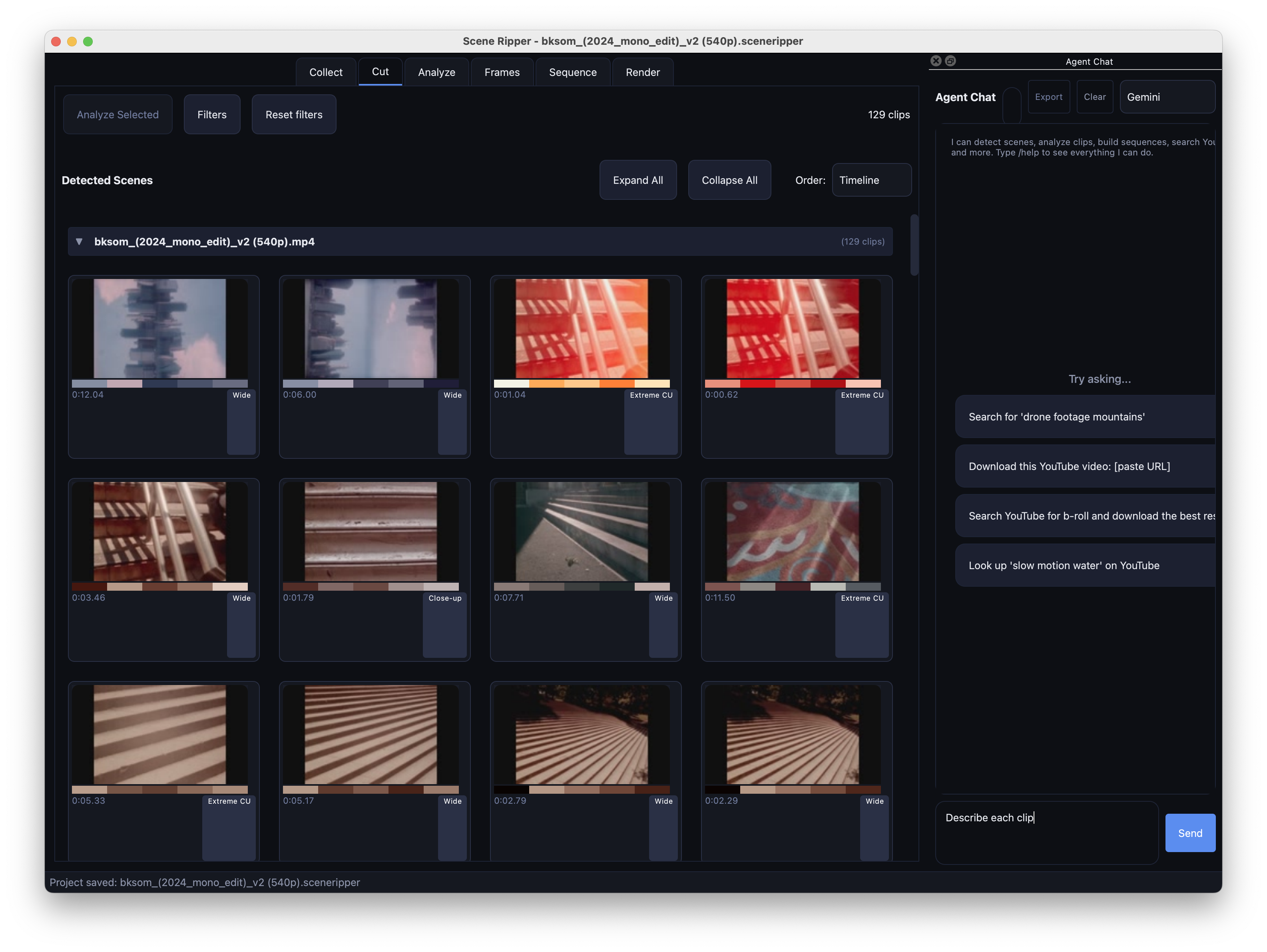
example · Scene Ripper
Let the agent call the app’s actions.
Scene Ripper divides video into shots. Its agent can use the app’s tools to find and return shots matching a request.
Your request defines what to look for. The agent calls the available actions, and you evaluate the returned shots.
return to the creative process
Which parts of the process still need your judgment?
Name one decision you could describe for the agent and one you want to keep. Consider source material, aesthetic choices, and deciding when to stop.
04
Homework and presentation prep
4.15–4.30 · 15 minutes
Next week: a 5min presentation
Show a result
Share output from your scheduled job, demonstrate your tool, or show both. You don’t need slides.
Explain a correction
Show a change to your brief, SOUL.md, README, or memory. Compare the results before and after.
Describe a boundary
Name a decision or action you kept for yourself. Explain why.
Answer two questions
Be ready to explain what you tested, what worked, and what remains unresolved.
Sign up in Discord by Wednesday. The class agent presents last.
Homework
Use your tool twice
Apply it to real work. Record problems and possible improvements before adding features.
Review the scheduled job
Continue through the second week if it’s running as intended. Decide whether to keep, pause, or revise it.
Review saved instructions
Read MEMORY.md and SOUL.md. Correct outdated entries and save a copy before major changes.
Prepare your presentation
Choose one result, one correction, and one boundary. Practice explaining them in six minutes.
Documentation and further study
Coding agents
Agent access to apps
Related course materials
NYU course slides: additional lessons on building and deploying apps
Week 5 slides
before next week
Use your tool twice. Bring a result and one correction.
Week 6 · final class
Computer use and show and tell
27 September · 2.00pm ET
Questions: Discord or derrick@titles.xyz · artificial-images.com